
Making Requests
Writing Queries
Section titled “Writing Queries”Now that you’ve read through our overview of GraphQL, you should be familiar with the concept of GraphQL queries. These queries are how you build your requests for data from a GraphQL API. With our API, you can write a query to obtain information about the products we will offer for a given address.
This is how you could write a query to find out if an address is eligible to receive our direct home sale product:
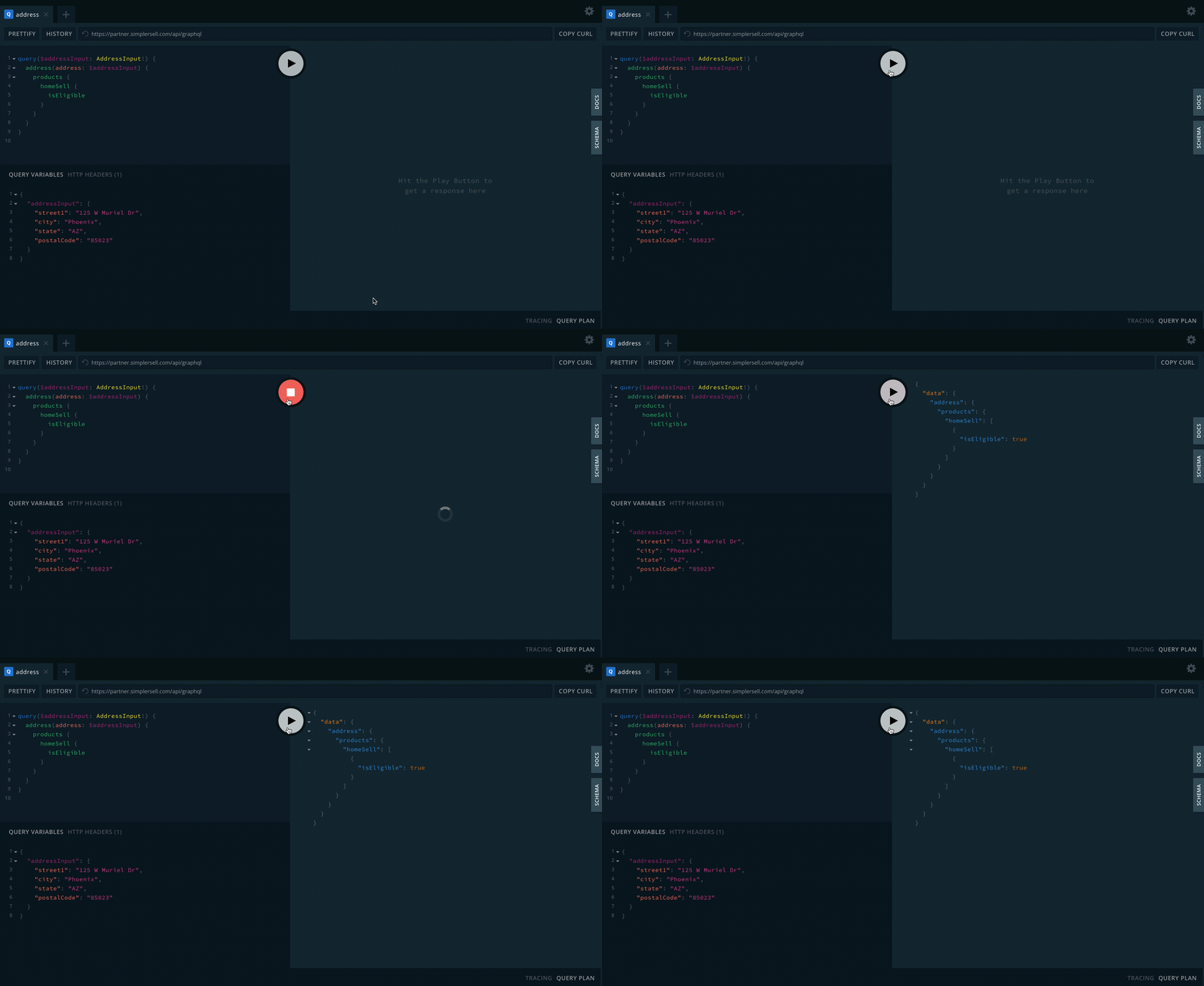
query($addressInput: AddressInput!) { address(address: $addressInput) { products { homeSell { isEligible } } }}If you are using our development playground, you can execute this query by simply pasting the code above into the editor on the left side of the playground and pressing the play button.
If you want to run this query from your own development environment, you can use one of the following code snippets.
Using node and the axios library
const axios = require('axios');
const query = `  query address($addressInput: AddressInput!) {    address(address: $addressInput) {      products {        homeSell {          isEligible        }      }    }  }`;
axios({ method: 'POST', url: 'https://partner.simplersell.com/api/graphql', headers: { Authorization: 'Basic <YOUR_API_KEY>', // Don't forget your API key 'Content-Type': 'application/json', }, data: JSON.stringify({ query, }),}).then((response) => { console.log(response);});curl -X POST \ -H "Authorization: Basic <YOUR_API_KEY>" \ -H "Content-type: application/json" \ --data '{ "query": "{ address(address:{ street1: \"129 West Muriel Dr\" city:\"Phoenix\" state: \"AZ\" postalCode: \"85023\" }) {products { homeSell { isEligible }}}}" }' \ https://partner.simplersell.com/api/graphqlNo matter which option you chose, you should have received an error. Let’s dive into the reasons why next.
Adding Query Variables
Section titled “Adding Query Variables”Taking a look at the query in JavaScript, we can see it takes a variable called $addressInput of type AddressInput!, which is passed to the address field. This is the GraphQL syntax for adding parameters to a request. In this case we are saying that the address query requires (because of the !) some input of the form AddressInput. This is a type dictated by our GraphQL schema. You can see it and all of our other types here. For now let’s just add this data to our request. If you are using the playground, just add it to the section on the bottom “QUERY VARIABLES”. If you are using javascript, you must add this code:
// ... query
{  "addressInput": {    street1: "38 E 70th St",    city: "New York",    state: "NY",    postalCode: "10021"  }}
//... axios post requestdata: JSON.stringify({    variables    query,  }),//... the rest of the axios post request
This input is necessary in order for the server to know what address you are interested in getting product offering details on. It is important to note, however, that not all queries in GraphQL require inputs.
Putting It All Together
Section titled “Putting It All Together”GraphQL Playground
Section titled “GraphQL Playground”You should get this as your final result:
Code Snippets
Section titled “Code Snippets”The final code should look like this:
const axios = require('axios');
const query = `  query address($addressInput: AddressInput!) {    address(address: $addressInput) {      products {        homeSell {          isEligible        }      }    }  }`;
const variables = {  addressInput: {    street1: '38 E 70th St',    city: 'New York',    state: 'NY',    postalCode: '10021',  },};
axios({ method: 'POST', url: 'https://partner.simplersell.com/api/graphql', headers: { Authorization: 'Basic <YOUR_API_KEY>', 'Content-Type': 'application/json', }, data: JSON.stringify({ variables, query, }),}).then((response) => { console.log(response);});curl -X POST \ -H "Authorization: Basic <YOUR_API_KEY>" \ -H "Content-type: application/json" \ --data '{ "query": "{ address(address:{ street1: \"125 West Muriel Drive\" city:\"Phoenix\" state: \"AZ\" postalCode: \"85023\" }) {products { homeSell { isEligible }}}}" }' \ https://partner.simplersell.com/api/graphqlNote: Our API will only process calls made from the server and blocks any calls made from the client.