Generating Offers
| Term | Definition |
|---|---|
| Offer Request | A request for a preliminary Opendoor Offer. Offer Requests are subject to a Denial. You can read more about the Offer Request data model here. |
| Denial | Refers to Opendoor being unable to provide an Opendoor Offer. You can read more about possible denial reasons here. |
| Opendoor Offer | A preliminary spot price for a home and fee estimates. Offers typically have a 7 day expiry period. Opendoor creates these offers based off of the inputs you provide us via the API as well as Opendoor’s proprietary market data. |
Making the Offer Request
Section titled “Making the Offer Request”An Offer Request is initialized using the offerRequestCreate mutation. When you’re calling this mutation, it’s important to include the opendoorOfferRequestId field in your query. This identifier maps to the offer request Opendoor creates for you upon response. It’s recommended that you store this identifier somewhere internally so that it can be referenced later, as you won’t be able to retrieve this data after the request.
Below is an example request for creating a new Offer Request:
Request
mutation OfferRequestCreate($offerRequestCreateInput: OfferRequestCreateInput!) { offerRequestCreate(params: $offerRequestCreateInput) { offerRequest { opendoorOfferRequestId } }}Variables
{ "offerRequestCreateInput": { "address": { "street1": "1 Post St", "city": "San Francisco", "state": "CA", "postalCode": "94104" } }}Fulfilling the Offer Request
Section titled “Fulfilling the Offer Request”Once the Offer Request has been initialized, you can begin fulfilling the the request by passing Opendoor additional data about the property and the seller. To do this, use the offerRequestUpdate mutation. The mutation takes an opendoorOfferRequestId variable, which maps to an offer request that you’ve previously created, as well as inputs that help us create the Opendoor Offer. Updates can be done incrementally, and it is possible to overwrite some values before submitting the request.
Upon submitting OfferInput values, it is possible that the request is denied. You will be indicated of this in the OfferRequestUpdatePayload if the OfferStatus field is equal to DENIED. When this is the case, the denialInfo field will also contain additional denial reasons, including the reason the home was denied and when it was denied. See more information here.
Once you’ve submitted both the sellerFullName and sellerEmail fields via the API, we will no longer consider any additional inputs you provide us in OfferInput for the pricing of the home. You should not pass us the sellerFullName and sellerEmail fields until you’re ready for Opendoor to begin processing your Offer Request to potentially create an Opendoor Offer; passing in these fields indicates to Opendoor that your request is ready for evaluation, and we will begin attempting to process your Opendoor Offer at that time. You are still allowed to pass in additional inputs.
Below is an example request for updating an existing Offer Request:
Request
mutation OfferRequestUpdate($offerRequestUpdateInput: OfferRequestUpdateInput!) { offerRequestUpdate(params: $offerRequestUpdateInput) { offerRequest { opendoorOfferRequestId offerStatus denialInfo { code } } }}Variables
{ "offerRequestUpdateInput": { "opendoorOfferRequestId": "e4ee693f-2648-4406-b046-d40c18359f56", "offerInput": { "homeBedrooms": 3, "homeBathroomsFull": 2, "homeBathroomsPartial": 1, "homeAboveGradeSqFt": 2143, "homeYearBuilt": 1995 } }}Retrieving Offer Request Data
Section titled “Retrieving Offer Request Data”At any time in the Offer Request lifecycle, you can retrieve the current state of the offer. You can do this by calling the offerRequest query resolver.
If you just submitted an Offer Request for evaluation (ie, you provided us with the sellerFullName and sellerEmail OfferInput fields), you may be interested in knowing when the Opendoor Offer has been created. If your system wants to be aware of an Opendoor Offer being ready as soon as possible, the current recommended approach is the poll this resolver until the OfferStatus field in the response is set equal to OFFERED.
Below is an example request for getting an existing Offer Request:
Request
query OfferRequest($opendoorOfferRequestId: String!) { offerRequest(opendoorOfferRequestId: $opendoorOfferRequestId) { opendoorOfferRequestId offerStatus denialInfo { code } offerData { headlinePriceCents } }}Variables
{ "opendoorOfferRequestId": "4b231de1-3916-402b-9357-2128ec67a08b"}Multi-product availability and underwriting
Section titled “Multi-product availability and underwriting”Use offerRequestWithProductsPricing
to read Cash and CNML separately. The root offerStatus rolls up product availability;
it is not a Cash-only status or an underwriting-approval signal. Cash can be
DENIED / PRODUCT_INACTIVE while CNML is ACCEPTED and the root remains OFFERED.
These semantics apply to existing and new requests.
For workflows that require completed underwriting, read the target product’s
underwritingState alongside its offerStatus and pricing. CNML ACCEPTED means
product acceptance, not underwriting approval. Require APPROVED before treating
the offer as approved after underwriting. Approval alone does not override a product
denial, withdrawal, or missing pricing.
query OfferRequestWithProductsPricing($opendoorOfferRequestId: String!) { offerRequestWithProductsPricing(opendoorOfferRequestId: $opendoorOfferRequestId) { opendoorOfferRequestId offerStatus sellDirect { offerStatus underwritingState underwritingCompletedAt denialInfo { code } } cnml { offerStatus underwritingState underwritingCompletedAt offerData { listPriceCents upfrontCashCents } } }}The underwriting fields sit on each product result, outside offerData, so Cash
ineligibility does not hide CNML’s underwriting signal. CNML’s fields refer to its
active underlying offer; Sell Direct’s fields refer to the current Cash offer. They
can differ when the products reference different offers. A refreshed offer does not
inherit another offer’s approval unless underwriting is reused on that active offer.
UNKNOWN means underwriting is draft or escalated. WALKED means Opendoor decided
not to proceed after underwriting. Null means the relevant offer linkage or
underwriting data is unavailable; it does not mean approval. Do not substitute
ACCEPTED, root OFFERED, or a completion timestamp for APPROVED.
Existing queries remain compatible. CNML-only integrations that read underwriting
from legacy Cash offerRequest.offerData should request the fields on cnml above.
Understanding the Offer Request State Machine
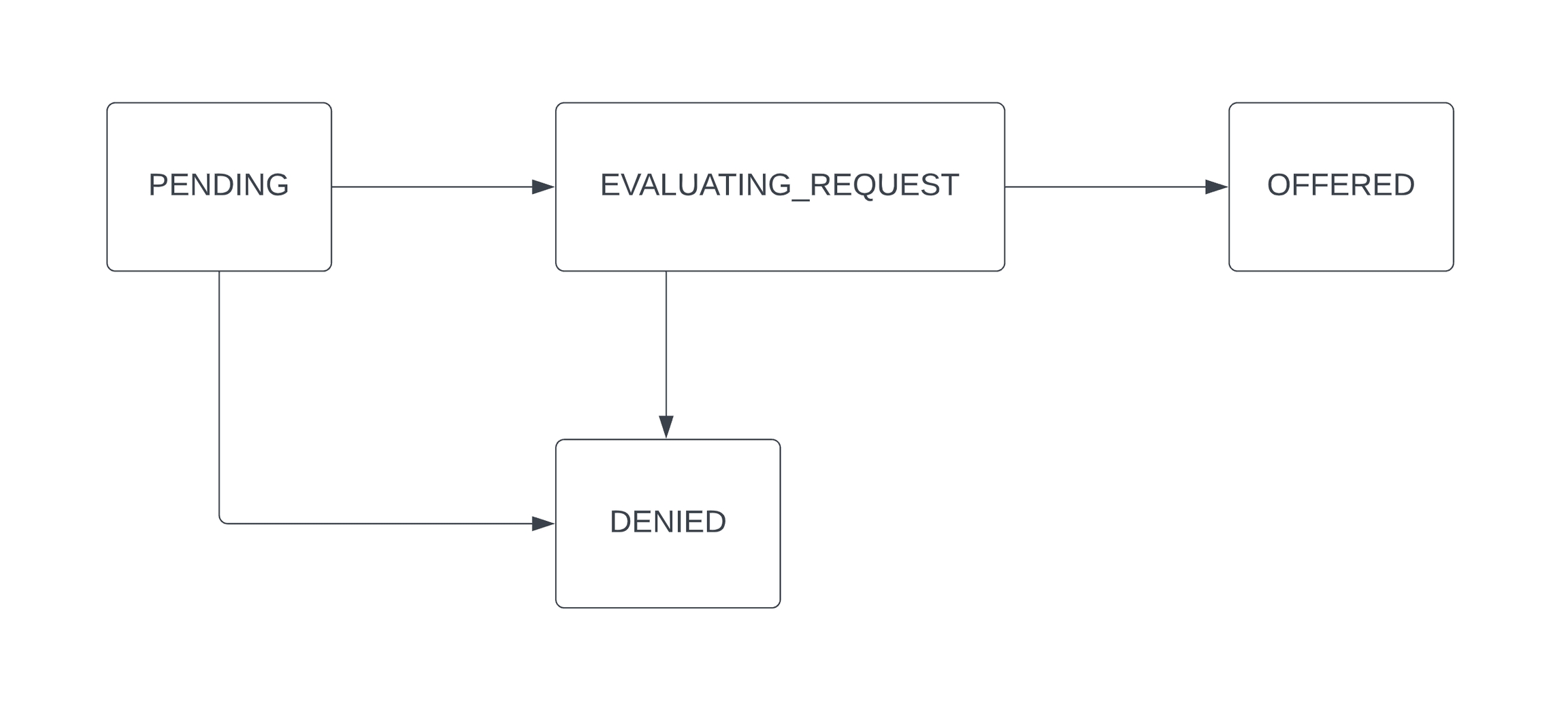
Section titled “Understanding the Offer Request State Machine”Every Offer Request has an OfferStatus that is in one of the following states, and follows the state machine diagramed below:
| State | Description |
|---|---|
PENDING | Denotes that we still accept OfferInput data to help us evaluate your Offer Request. Inputs you provide us may revoke the request’s eligibility for an offer, in which case the state will transition to DENIED. Once you’ve provided sellerFullName and sellerEmail, this state will transition to EVALUATING_REQUEST if still eligible. |
EVALUATING_REQUEST | Transient state that denotes that we’ve began evaluating your Offer Request based on the data you’ve provided us. If we can create an Opendoor Offer, the state eventually transitions to OFFERED. Otherwise, it will transition to DENIED. NOTE: If eligible for an Opendoor Offer, the time it takes for an Offer Request to transition to OFFERED can be up to 30 seconds. |
DENIED | A terminal state. Denotes that the Offer Request is deemed ineligible for an Opendoor Offer. |
OFFERED | A terminal state. Denotes that we created an Opendoor Offer |